Catalog
The KNX Clarity catalog is a shared, read-only library of KNX manufacturers and products. It is used in two places:
- During planning — browse manufacturers and products to pick hardware for a new installation, compare candidates side by side, and find compatible alternatives.
- Inside a project — every device extracted from an ETS upload is automatically matched against the catalog, so the device row can show the product image, datasheet, and communication objects without the integrator having to dig them up manually.
- Desktop
- Mobile

Scope
The catalog is global — every KNX Clarity user sees the same catalog regardless of which organisation they belong to. It is maintained by a small group of KNX Clarity catalog admins and grows automatically from manufacturer data sources and (opt-in) from uploaded ETS projects.
That means:
- You cannot add or edit a catalog entry yourself. If a product is missing, use the Report missing product action — it is available on any device row without a catalog match and on the catalog page itself. Your report lands directly in the catalog admins' review queue.
- Catalog data does not include pricing — it is a technical reference, not a shop.
Browsing
Click Katalog (Catalog) in the sidebar, under Werkzeuge (Tools). The page has three levels:
- Manufacturers — left sidebar. Alphabetical, with a count of products per manufacturer and its own search box.
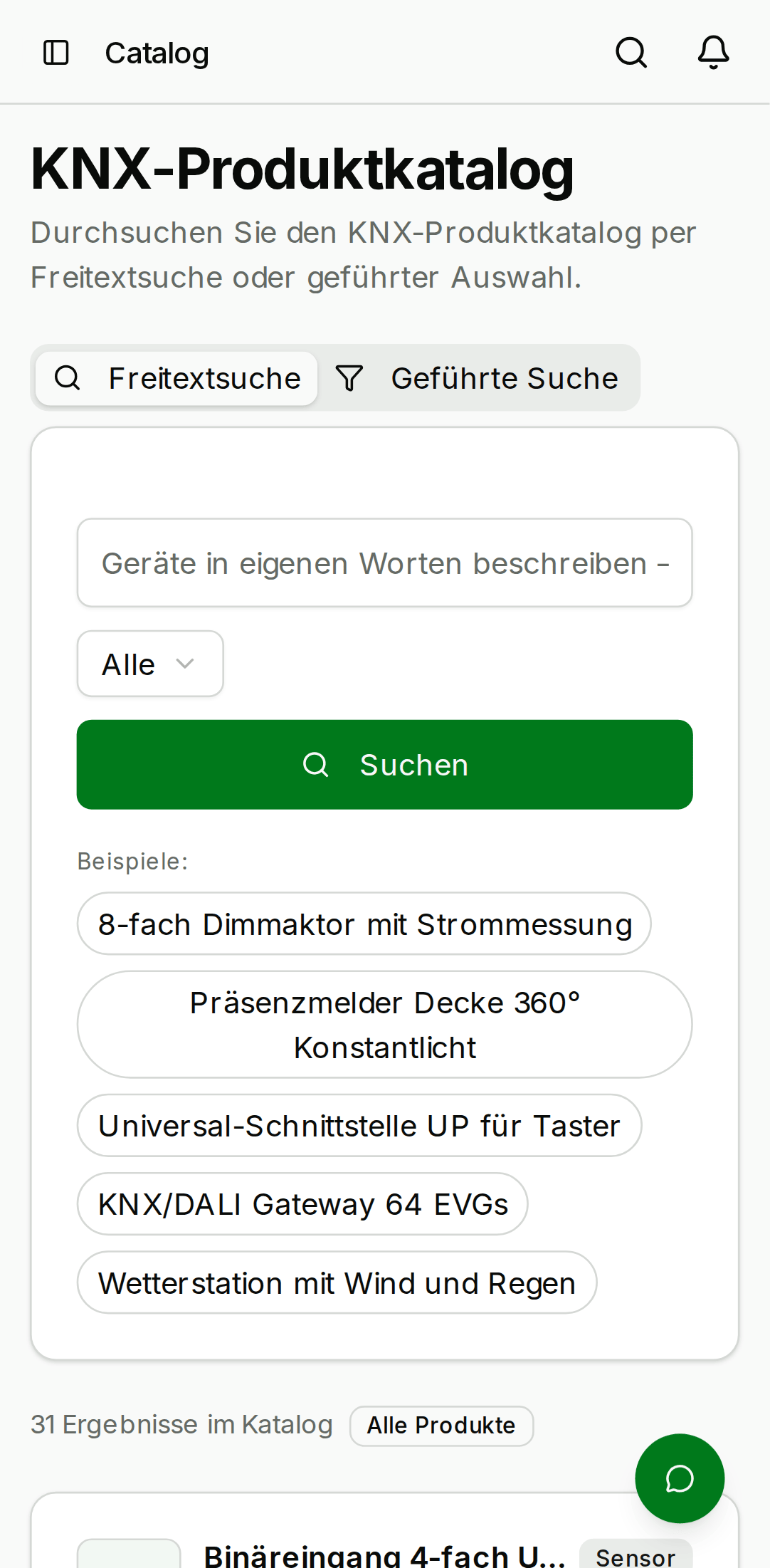
- Products — main area, as a card grid or a compact list. Filterable by category, by "has datasheet" and "has application data", and by your favourites. Sortable by name, manufacturer, or category.
- Product detail — click a card to see the full technical record: order number, datapoint types, the communication-object table (number, name, function, DPT), application-program parameters, mask version, bus-connection and mounting details, plus the datasheet PDF and product image where available.
Two selection tools sit on every product card:
- Favourites — star products to build a personal shortlist and filter the grid down to it.
- Compare — select several products and open a side-by-side comparison table of their technical attributes.
Search
The search box at the top runs in three escalating stages, and a small badge next to the result count tells you which one produced your results:
- Browse — instant client-side filtering across manufacturer, product name, order number, and category.
- Text search — a server-side keyword search across the full product records.
- Semantic search — if keywords don't hit, the backend falls back to meaning-based matching, so a query like "dimmer for staircase lighting" finds products whose descriptions match the intent rather than the literal words.
There is also a guided Device finder: describe what the device needs to do in plain language and the catalog suggests matching products.
Product lifecycle
Every product carries a lifecycle status:
- Active — the normal state; available on the market.
- Superseded — replaced by a newer product. The product page shows a badge and, where known, a direct link to the successor.
- Withdrawn — no longer available. Withdrawn products are hidden from browsing by default (a Show withdrawn filter brings them back), excluded from search results, and never recommended as compatible alternatives.
Withdrawn products are still matched inside projects: an existing installation doesn't stop containing a device because the manufacturer discontinued it. Device rows flag such matches with a "product withdrawn" badge so you can spot end-of-life hardware in the installed base.
Lifecycle status is set by catalog admins and is never changed by automated imports.
Automatic matching inside a project
When an ETS upload is applied to a project, the backend matches each extracted device against the catalog and stores the result on the device, together with a confidence grade:
- Exact — the order number matches precisely.
- High — a strong match, e.g. the same base order number with a project-specific suffix.
- Medium — a plausible but fuzzier match.
The grade is shown as a badge on the device row. Live bus scans can corroborate a match: if a scanned device's mask version agrees with the catalog product, the stored confidence is upgraded.
A matched device row offers a fold-out datasheet panel with the product image, the communication-object table, the datasheet PDF, a link to the full catalog entry, and compatible alternatives — other catalog products that speak the same datapoint types.
If there is no match (typical for very new or very old hardware), the device row shows a Report missing product link instead. The report (manufacturer, model, order number, optional note) goes to the catalog admins and feeds the pipeline that decides which data sources to add next.
- Desktop
- Mobile


Contributing device data
The catalog can grow from the ETS projects that organisations upload — but only with consent. The first time your organisation uploads an ETS file you are asked whether the technical device definitions contained in your uploads (product names, order numbers, communication objects, datapoint types) may flow into the shared catalog. Nothing project-specific — no addresses, room names, or topology — is ever harvested.
The decision is stored per organisation, defaults to off, and can be changed at any time in the organisation settings.
For catalog admins
Members of the catalog admin group have an additional admin area covering the machinery behind the catalog:
- Imports — upload manufacturer catalog files (
.knxprod/ bulk exports); imports are idempotent, so re-importing a file updates existing entries instead of duplicating them. - Data sources — a registry of manufacturer download portals the weekly crawler visits. Sources can be enabled, disabled, or staged for verification, and new default sources can be synced in without a deployment.
- Crawl history — every crawl run is recorded, including per-source yield. Sources that suddenly stop yielding files are flagged, which is how broken scrapers get noticed.
- Missing-product reports — the queue of user-submitted reports, with open/resolved/dismissed states.
- Lifecycle — the status control (active / superseded / withdrawn, plus successor link) on each product page.
Imported data becomes visible immediately; lifecycle decisions are the admin-owned part and survive any re-import. Regular org members do not see these surfaces.